
Modernizing Legacy Systems for Growth Without Breaking Operations
By QuasarSeed · November 9, 2026 · 13 min read

Last Updated: November 18, 2026
Quick Summary
Modernizing legacy systems for growth means replacing or reshaping the software your business already depends on so it can support more customers, faster changes, and lower operating risk. Treat it as a business decision owned by the people who feel the friction, not a technology project delegated to whoever maintains the server. Pick the smallest pattern that removes the actual constraint.
Key takeaways
- Workarounds becoming normal, like spreadsheets beside the official system, signal a growth problem.
- Rehosting, replatforming, refactoring and replacement trade effort against risk differently; pick the smallest pattern that removes the constraint.
- Score candidate systems 1 to 5 on business value, technical risk, dependency weight and modernization effort.
- Profile and reconcile data before cutover, and write down acceptable data loss for rollback.
- Define acceptance tests before development starts and name who supports the system after handover.
Why Modernizing Legacy Systems for Growth Is a Business Decision, Not a Tech Project
Modernizing legacy systems for growth means replacing or reshaping the software your business already depends on so it can support more customers, faster changes, and lower operating risk.
Consider what a legacy system actually costs you.
That framing changes who owns the decision. A technology project gets delegated to whoever maintains the server. A business decision gets owned by the people who feel the friction: operations, sales, finance, and support.
The rest of this guide covers the signs, the approaches, the risks, and the checks that separate a controlled modernization from an expensive rebuild that stalls halfway.
Signs Your Legacy System Is Holding Back Growth
The clearest sign is that workarounds have become normal. When your team keeps a spreadsheet beside the official system because the official system cannot do the job, you have a growth problem disguised as a habit.
Look for these signals:
- Staff re-enter the same data into two or three places
- Simple changes take weeks because every edit risks breaking something else
- Reporting requires manual exports and cleanup before anyone trusts the numbers
- Only one or two people understand how a critical process actually runs
- New pricing, products, or service tiers are hard to launch
- Integrations with newer tools are fragile or simply missing
- Support requests route through email and memory instead of a system
Technical debt is the usual label, but the business translation is simpler: the system has stopped absorbing change. A system that cannot absorb change cannot support growth, because growth is change repeated at higher volume.
There's a quieter signal too. Ask your team what they'd fix with a free week.
Legacy System Modernization Examples: What Different Approaches Look Like in Practice
Legacy system modernization examples are easier to understand as patterns than as products.
Rehosting moves the application to newer infrastructure with minimal code change, like lifting an on-premise order system onto cloud servers.
Replatforming moves the application to a new platform with targeted changes, such as a managed database or a newer framework version, without redesigning how it works.
Refactoring restructures existing code to make it easier to change. This is the pattern for systems that are functionally sound but expensive to modify.
Replacement retires the system and builds or buys a successor. This carries the highest risk and the highest ceiling.
A useful rule: the further you move from rehosting toward replacement, the more capability you gain and the more you spend in time, money, and disruption.
Legacy System Migration Strategy: Keep, Integrate, Incrementally Modernize, or Replace
A legacy system migration strategy starts with one honest question: does this system still earn its place? Keeping is a valid answer when the system is stable, cheap to run, and not blocking anything that matters.
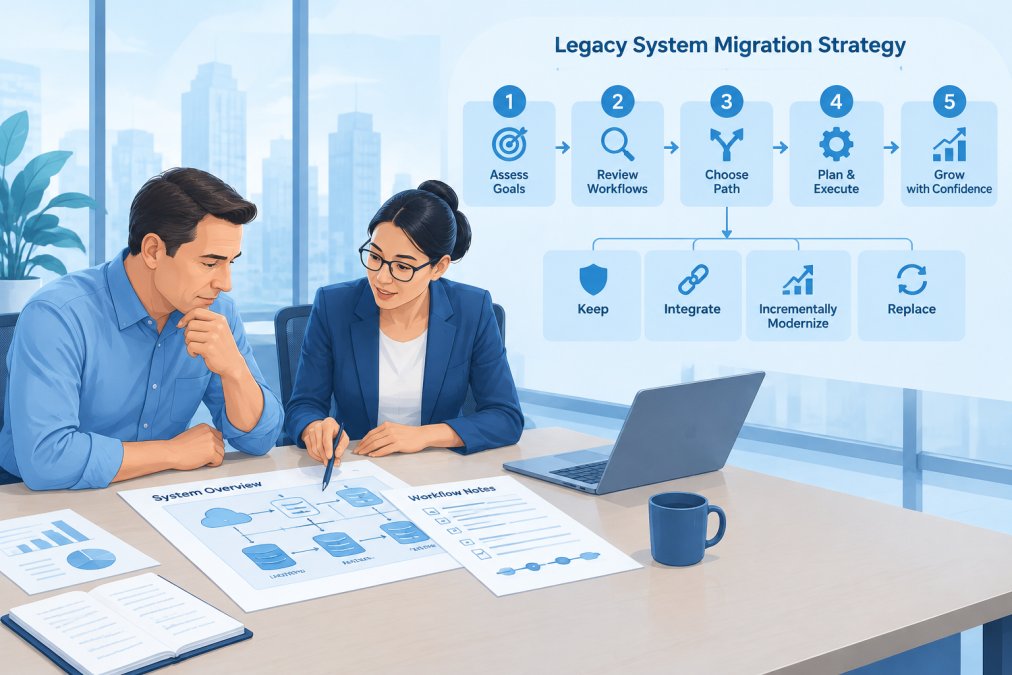
Start with the four paths, then use a scoring pass to decide which system goes first.
| Situation | Likely path | Main trade-off |
|---|---|---|
| Stable system, low change volume | Keep and maintain | Risk of drifting behind over time |
| Good core, weak connections | Integrate | Integration layers need ongoing ownership |
| Works, but expensive to change | Incremental modernization | Slower visible progress |
| Core assumptions no longer fit | Replace | Highest cost and disruption |
Integration deserves more attention than it usually gets. Connecting your operational systems to a lead and follow-up layer is often the cheaper path, and it's the kind of work we scope through lead systems that capture, route and follow up. When the gap is a tool nobody sells, custom software for the work your tools do not fit is the other option worth pricing before you commit to a rebuild.
A prioritization score for choosing what to tackle first
A simple scoring model keeps the decision out of whoever argues loudest. Score each candidate system from 1 to 5 on four dimensions, then look at the pattern rather than the total alone.
- Business value. How much revenue, cost, or customer experience improves if this system changes. A system that blocks a new product line scores high; one that only annoys the finance team scores lower.
- Technical risk. How fragile the system is today, how hard it is to change, and how exposed you are if it fails. High risk argues for acting sooner, but it also raises the cost of a rushed move.
- Dependency weight. How many other systems, reports, and partner feeds rely on this one. A heavily depended-on system is expensive to touch and dangerous to ignore.
- Modernization effort. The realistic time, money, and disruption required. Effort is a cost, not a reason to skip a high-value system, but it shapes sequencing.
A common pattern is to start with a system that scores high on business value and moderate on effort, even if it isn't the most broken one. Early wins build the internal trust later, riskier phases depend on.
Watch out: scoring models drift into false precision. The numbers are a conversation tool, not a verdict. If two systems score close, pick the one with a clearer rollback path.
When keeping is the right answer
Keeping isn't laziness. If a system is stable, its cost is predictable, and nothing the business wants to do next is blocked by it, spending on a replacement is a choice to spend elsewhere later. The condition is that you revisit the decision on a schedule, because a system that's fine this year can become the constraint next year when volume doubles. Put a review date on the calendar and note what would change the answer.
When integration beats replacement
If the core logic still matches how the business makes money but the edges are brittle, integration is usually the cheapest path to relief. The trade-off is ownership: every integration layer needs someone responsible for it, or it becomes a new point of failure. Before choosing integration, confirm the old system exposes a supported way to exchange data. If it only supports manual exports, you're building a workaround, not an integration, and that changes the math.
Legacy System Modernization Risks and How to Contain Them
Legacy system modernization risks concentrate in four places: data, dependencies, people, and continuity. Most failed projects don't fail on technology. They fail because nobody mapped what depended on what, or because the team had no plan for the day the new system misbehaves.
Data risk. Historical records are often messier than anyone expects. Duplicate customers, inconsistent statuses, and fields repurposed years ago all surface during migration.
Dependency risk. One old system usually feeds several others: a billing tool, a reporting job, a partner feed.
People risk. The person who knows how the system really works may be one retirement away from taking that knowledge with them.
Continuity risk. Plan for how the business runs if the new system is unavailable. A rollback plan isn't pessimism. It's the thing that lets you move at a reasonable pace instead of freezing.
A cutover and rollback plan you can actually run
A cutover is the moment traffic, data, or work moves from the old system to the new one. The plan should answer four questions in writing before the date is set.
- What is the go/no-go check? Name the specific tests that must pass and the person who decides. "Looks good" is not a check.
- How do we roll back? Confirm the old system stays available and its data stays current enough to resume. If the old system is frozen at cutover, rollback means losing everything entered since, so decide how much data loss is acceptable and write it down.
- Who is on call, and for how long? The weeks after cutover are when most problems appear. Staff the window deliberately rather than assuming the launch team will stay available.
- How do we reconcile data after the switch? Compare record counts, key totals, and a sample of real transactions between old and new. Discrepancies get investigated, not explained away.
A phased cutover, where one workflow or one customer segment moves first, limits the blast radius. Run old and new in parallel for the highest-risk workflow if the cost of double entry is bearable.
Watch out: the most common mistake is treating the go-live date as the finish line. Teams that plan the post-cutover weeks as carefully as the launch recover faster when something breaks, because the rollback path and the on-call owner are already agreed.
Legacy System Modernization Best Practices for Operators
Legacy system modernization best practices come down to sequencing and proof. Move in stages, prove each stage works, and keep the old path available until the new one has earned trust.
A practical sequence looks like this:
- Inventory the workflows the system supports, not just the software itself
- Confirm who owns the data and who can grant access
- Pick one workflow to move first, ideally a contained one
- Run old and new in parallel where the risk justifies it
- Define acceptance tests before development starts, not after
- Train staff on the new process, not just the new screens
- Agree who supports the system after handover, in writing
That last point matters more than most teams expect. A modernization that ends with no clear owner becomes a new legacy system within a few years. Handover should include documentation, access, and a named responsible party.
Keep scope written down. A short written scope covering deliverables, exclusions, and responsibilities prevents the slow expansion that turns a contained project into an open-ended one.
What to Test Before You Move Off a Legacy System
Testing before cutover is where confidence comes from. The goal is not to prove the new system is perfect. It is to prove it handles the cases your business actually sees.
Build your acceptance tests from real work:
- A complete order, claim, or case from start to finish
- The edge cases your team complains about most
- A month-end or reporting cycle, compared against the old output
- Access checks for each role, including the ones nobody remembers
- A failure scenario, to confirm the rollback path works
Compare outputs side by side. If the new system produces different numbers, find out why before you switch, not after.
Also test the human side. Have the people who do the work every day run the new process without coaching. If they need a cheat sheet on day one, the process needs work, not more training.
Scoping Your Legacy System Modernization Project
Scoping turns intent into something a partner can price and deliver. Bring four things to that conversation: the workflows in scope, the systems and data involved, the constraints on downtime, and the outcome you are measuring.
Be clear about what success looks like. "Faster order changes" is measurable. "Modern system" is not.
Budget depends on scope, team rates, and timeline, so treat any figure you hear before discovery as a guess. If you want to understand what drives cost before you commit, our guide to planning custom software development pricing breaks down the inputs. It also helps to know what to prepare before a custom software consultation, because the quality of that first conversation shapes everything after it.
A good partner will tell you when keeping or integrating beats replacing. That answer is worth more than an enthusiastic yes to a rebuild. When you are ready to talk through the options, you can start a project and get a straight read on which path fits.
Modernizing legacy systems is a decision about what your business needs to be able to do next, and the systems should follow that answer. Projects that follow an agreed written scope covering deliverables, exclusions, responsibilities, and pricing give you a clear basis for comparing options. Start a project to talk through your options.
Frequently Asked Questions
How do you modernize a legacy system without disrupting operations?
Start with a dependency and workflow inventory so you know which processes touch the legacy system and which can run independently. Move in phases rather than a single cutover, keep the old system running in parallel until acceptance tests pass, and define a rollback path before each release. Staff training and a named owner on the business side matter as much as the technical work. The goal is operational continuity during the transition, not a zero-downtime promise, which no responsible partner should make.
Should you replace a legacy system or integrate it with newer tools?
It depends on where the system hurts. If the core logic works and the problem is reporting, customer-facing tools, or data silos, integration through APIs or a middleware layer is often cheaper and lower risk. If the system is unsupported, expensive to maintain, or blocks workflows you need to grow, replacement or incremental modernization makes more sense. Run a legacy system migration strategy review that scores each system from 1 to 5 on business value, technical risk, dependency weight and modernization effort before deciding.
What are common examples of legacy systems in a business?
Common legacy system modernization examples include on-premise accounting or ERP software past its vendor support window, custom-built internal tools maintained by one person, older CRM or order management databases with no API, and spreadsheet-driven workflows that have become de facto systems. These systems often work fine day to day but create technical debt, block automation, and raise cybersecurity and data security concerns as the business grows.
What should a business test before moving away from a legacy system?
Test data migration accuracy first: confirm historical data, customer records, and financial figures land correctly in the new system. Then run acceptance tests on your highest-risk workflows, including edge cases like refunds, partial shipments, or multi-step approvals. Check user access and permissions, integration points with other tools, and reporting output against the old system. Finally, rehearse the rollback and confirm who has authority to trigger it, so a failed release does not become a business disruption.