
Need Help Fixing a Workflow Problem? What to Hire
By QuasarSeed · November 10, 2026 · 13 min read

Last Updated: November 18, 2026
Quick Summary
To choose technical help for a business workflow problem, define the problem before picking a job title: write down the workflow as it runs today, note where it stalls, and decide whether you need a bounded implementation project, system integration support, an audit, or separately scoped technical leadership. The right hire depends on the shape of the problem, not the size of the budget.
Key takeaways
- A bounded fix needs a builder, a tangled system needs an integrator, and a fuzzy process needs an auditor first.
- Answer three questions about your finished result, data flow, and clarity to pick the engagement type.
- Run a workflow automation audit before hiring so you don't pay a builder to solve an unscoped problem.
- Write a software project scope template covering goal, deliverables, exclusions, responsibilities, access, acceptance tests, handover, and ongoing support.
- Ask every provider the same questions and compare answers on ownership, handover, testing, and change handling, not sales pitches.
Start With the Problem, Not the Job Title
Most workflow problems get misdiagnosed before anyone is hired. A team says "we need a developer," when what they actually need is someone to map the process first.
A common pattern: a business owner knows something is slow or broken and jumps straight to hiring.
So define the problem first. Write down the workflow as it runs today. Note where it stalls, who touches it, and how often.
Here's the throughline for this whole article: the right hire depends on the shape of the problem, not the size of the budget. A bounded fix needs a builder.
Four engagement types and what each one delivers
Technical help for a business workflow problem comes in four basic shapes. Each solves a different kind of problem.
- Bounded implementation project. You know what you want built. A defined tool, form, dashboard, or integration gets delivered against a written scope.
- System integration support. Your tools exist but don't talk to each other. Someone connects them and keeps the connections working.
- An audit. You suspect the problem but can't name it. An auditor maps the workflow and recommends a fix before anyone builds.
- Technical leadership. You need direction across several projects, not hands on one. This is scoped advice and oversight, not permanent staffing.
For an overview of QuasarSeed's published services, see our services page.
A quick way to tell which one you need
Answer three questions and the choice usually makes itself.
- Can you describe the finished result in one sentence? If yes, you likely need a bounded project.
- Do your tools already work but fail to share data? That points to integration support.
- Are you unsure what's broken? Start with an audit.
| Your situation | Engagement type | What you get |
|---|---|---|
| Clear deliverable, fixed outcome | Implementation project | A built and tested tool |
| Tools work, data doesn't flow | Integration support | Connected systems |
| Problem unclear | Audit | A map and a recommendation |
| Multiple projects, no direction | Technical leadership | Scoped oversight |
Run a Workflow Automation Audit Before You Hire Anyone
A workflow automation audit is a structured review of how work moves through your business, where manual steps cost time, and which fixes would pay off first.
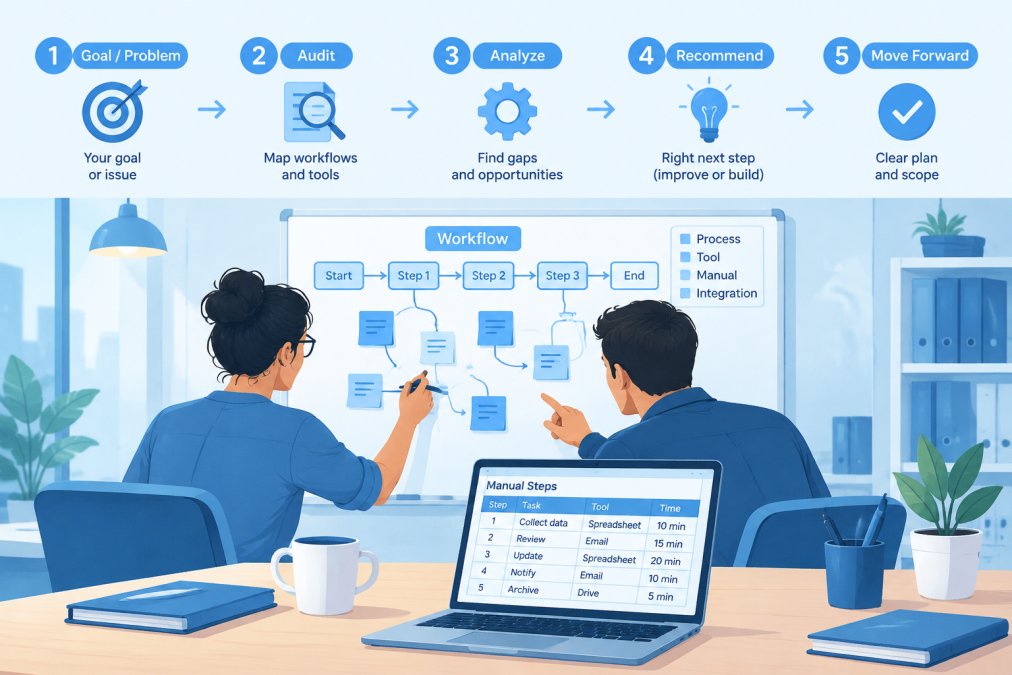
This step saves money. A common mistake is hiring a builder to solve a problem nobody scoped. The builder delivers exactly what was asked, and it turns out to be the wrong thing. An audit catches that early.
A practical audit covers five things:
- Every step in the workflow, who does it, and how long it takes
- Where data gets re-typed or copied by hand
- Which tools already exist and what they can do
- Where errors and delays cluster
- A short list of fixes ranked by effort and payoff
You can run a light version yourself. If you want to know what inputs make that conversation productive, see the 7 things to prepare before a custom software consultation.
What Business Workflow Software Examples Reveal About the Fix
Real business workflow software examples show a pattern: most problems are connection problems, not missing-tool problems. A CRM that doesn't update the invoice system. A booking form that emails a person who then re-types the details elsewhere.
Common examples tend to share a few patterns:
- Order intake that re-enters data by hand. The fix is usually an integration, not new software.
- Approval chains run over email. The fix is a small workflow tool with routing rules.
- Reports built by copying between spreadsheets. The fix is a shared data source with a dashboard.
- Customer follow-up that depends on memory. The fix is automated triggers tied to real events.
The lesson is consistent. Before you buy or build, check whether your existing tools can be connected. Often they can. That changes who you hire: an integrator, not a builder.
When You Need System Integration Support Instead of a New System
System integration support is the work of making separate tools share data and trigger each other reliably. You need it when the tools are fine on their own but the handoffs between them are manual.
Replacing a working system is expensive and disruptive. Integration is often the smaller, safer move. Integrations need maintenance when any connected tool changes, so budget for that upkeep.
Signs you need integration support rather than a rebuild:
- Staff copy data between two systems daily
- One tool's update doesn't reach another
- Errors appear at the handoff, not inside a tool
- You've bought software that nobody fully uses
If the underlying tools genuinely can't do the job, that's when custom software earns its place. QuasarSeed's custom software services cover building software around a process when existing tools can't fit the work.
Build a Software Project Scope Template Before You Compare Providers
A software project scope template is a written document that defines what will be built, what won't, who is responsible for what, and how completion is judged. It's the single best defense against a project that balloons. Write it before you talk to providers, then measure every quote against the same document.
Here's what to include:
- Goal: the business outcome in one sentence
- Deliverables: the specific things to be built, each tied to a workflow step
- Exclusions: what is explicitly out of scope
- Responsibilities: what you provide versus what the provider provides
- Access: systems, accounts, and data the provider needs, and who grants them
- Acceptance tests: how you'll confirm each deliverable works
- Handover: what documentation, credentials, and access you receive at the end
- Ongoing support: what happens after launch, and who owns maintenance
That last set matters most. A provider who won't put handover and ownership in writing is a risk. You want to own your systems, not rent them.
Prioritize before you scope
A scope that tries to fix everything at once is a scope that fixes nothing on time. Before you write deliverables, rank the candidate fixes so the project has a defensible starting point.
The same logic applies to sequencing legacy modernization, applied to a single workflow. It keeps the first release small enough to test and big enough to matter.
Acceptance tests: the clause most scopes leave out
Acceptance tests define "done" in checkable terms. Instead of "the dashboard works," write "the dashboard shows today's orders within five minutes of entry, and matches the source system for a sample of ten orders." Each test should be specific enough to pass or fail, tied to a real workflow step, and agreed before work starts. This clause prevents the classic dispute where the provider says it's finished and you say it isn't. Both sides point to the same test.
Handover and rollback belong in the scope too
Handover isn't a courtesy at the end; it's a deliverable. Spell out what you receive: source code or repository access, admin accounts in your name, environment and deployment documentation, a data dictionary, and a named contact for the support period.
Pair handover with a rollback plan for anything that touches live operations.
Watch out: a scope with no exclusions and no rollback clause is where budgets and trust both break. Get both in writing before signing.
How to Evaluate In-House, Freelance and Agency Technical Help
Each type of technical help fits a different situation. None is universally best. The right choice depends on how long you need help, how much oversight you can give, and how much of the work is ongoing.
| Option | Best for | Watch out for |
|---|---|---|
| In-house hire | Long-term, core systems | Slow to start, hard to undo |
| Freelancer | Small, well-defined tasks | Single point of failure |
| Agency | Multi-part projects, handover | Scope must be tight |
In-house help gives you control and continuity. The trade-off is commitment: hiring takes time, and a bad fit is costly to reverse. Freelancers suit a single bounded task with a clear spec.
Ask each candidate the same questions and compare answers, not sales pitches. For a deeper look at what drives project cost, read how to plan custom software development pricing.
The people side nobody scopes
Most workflow projects don't fail because the code is wrong. They fail because the people who do the work don't adopt the change. That's the gap the comparison table above can't capture, and it's worth planning for before you pick anyone.
Three things decide adoption:
- Who owns the process after launch. Name a person inside the business who is accountable for the new workflow, not just the provider. Without an internal owner, the tool drifts and the old spreadsheet comes back.
- How training and knowledge transfer happen. The provider should hand over not just documentation but a walkthrough for the staff who use the workflow daily. Budget time for that, and ask who runs it.
- How resistance gets handled. People who built the old workaround have reasons for it. Ask the provider how they'll surface those concerns during discovery, because a fix that ignores them gets quietly bypassed.
This is where an agency or a scoped technical leader earns their place over a lone freelancer: they can plan the change management alongside the build. If your team is small and the workflow is low-stakes, a freelancer plus a clear internal owner may be enough.
Match the engagement to your oversight capacity
Your own capacity to manage the work is a selection criterion, not an afterthought. If you can review progress weekly and answer questions fast, a smaller, cheaper engagement can work. If you can't, you need a provider who runs discovery, flags risks, and reports in plain language without being chased. Be honest about which one you are before you compare quotes, because the cheapest option is often the most expensive one to manage.
The Questions to Ask Before You Sign
Ask these before any contract. The answers tell you whether a provider thinks in outcomes or just in hours.
- Can you describe the finished result in one sentence?
- What's explicitly out of scope?
- Who owns the code and accounts at handover?
- How will we test that each deliverable works?
- What happens if a connected tool changes after launch?
- Who maintains this, and at what cost structure?
- What access and data do you need from us?
- How do you handle a change in requirements mid-project?
A provider who answers these clearly is thinking about your outcome. One who dodges the ownership and handover questions is a warning sign. Watch out: a vague scope plus unclear ownership is how projects balloon. Get both in writing.
When you're ready to move from shortlist to conversation, you can start a project and describe what you need built.
Scope Your Custom Software Project With QuasarSeed
The hardest part of hiring technical help isn't finding people. It's knowing what to ask for.
QuasarSeed starts with your goal or observable problem, examines your existing workflows and tools, and recommends the right next step, which may be improving a system you already have.
To see how the pieces fit, review our custom software services or the full services overview. Then tell us what's broken.
If your workflow problem keeps getting patched instead of solved, the fix starts with a clear scope and the right kind of help.
Frequently Asked Questions
How do I choose technical help for a business workflow problem?
Match the engagement to the problem before you look at providers. If you cannot name the manual steps and where they break, start with an audit. If the tools work but do not talk to each other, ask for system integration support. If the process itself is wrong and you already know what the new one should be, a bounded implementation project with a written scope fits. If you're not sure yet what is wrong, start with the audit. Separately scoped technical leadership fits when you need direction across several projects but are not ready to hire. Write down the outcome, who owns access and data, and how you will test the finished work, then compare providers against that document rather than against each other.
Should I audit my workflow before building custom software?
Yes, in most cases. A workflow automation audit maps the steps people actually take, including the spreadsheet exports, email forwards and re-keying that never show up in a process diagram. That map often shows that two existing tools plus one integration solve the problem, which costs far less than a build. It also gives you the requirements list a developer needs. Skipping the audit tends to produce software that automates a broken process accurately, which is the expensive version of the same problem.
When does a business need integration support instead of a new system?
When each tool does its own job well but the handoffs between them are manual. Common signs: someone copies order data from a storefront into a CRM, invoices get retyped, or booking confirmations are sent by hand. Integration support connects those systems through their APIs so data moves without a person in the middle. A replacement system makes sense when a tool is genuinely unfit, unsupported, or so far from what the business needs that connecting it just preserves the problem.
What should a software project scope include?
A usable scope names the outcome in business terms, lists deliverables and explicit exclusions, and states who is responsible for what on both sides. It should cover access to systems and data, how historical data gets migrated, how acceptance is tested, what happens at handover, and what ongoing support costs if you want it. Ask for the exclusions in writing, because that is where budget surprises come from. A scope that only lists features without responsibilities or acceptance criteria leaves you with nothing to hold anyone to.